1. Log in to your cPanel account.
2. In the Domains section, click on Redirects.

3. Scroll down to the end of the page. Under Current Redirects, locate the domain and click on remove. 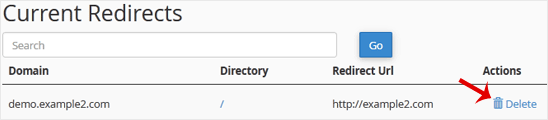
4. For confirmation, click on Remove Redirect once more. 
1. Log in to your cPanel account.
2. In the Domains section, click on Redirects.
3. Scroll down to the end of the page. Under Current Redirects, locate the domain and click on remove.
4. For confirmation, click on Remove Redirect once more.
0 مستخدمون وجدوا هذه المقالة مفيدة (0 التصويتات )
الزائر الأكثر زيارة